
[memb_sync_contact]
Ninjatrader 8 Install
For detailed features please visit the OFA NT8 Tutorial Section
***CLOSE ALL NT8 CHARTS AND WORKSPACES BEFORE INSTALL or UPDATE***
Key Details:
- Support FAQ
- Live Accounts: OFA will work with Free NT8 versions 8.1.1.0 and above
- Demo Accounts: OFA will work with Free NT8 versions 8.1.1.0 and above
- DO NOT IMPORT TO NT8 – USE INSTALLER
- Requires Windows (recommend 64bit with 8+ GB RAM)
- Requires Real-Time Tick-by-Tick Order Flow Data (or NT replay data)
- Continuum, CQG, Rithmic, Kinetic, IQfeed, eSignal, BarChart, FXCM, Gain
- OFA not supported by IB, TDA, Google and others
Current Version:
- CLOSE ALL CHARTS/WORKSPACES BEFORE INSTALLING!!!!!
- Video of Update
[memb_has_any_tag tagid=2434]
[else_memb_has_any_tag]
- Subscribe to Annual Support for Current Version Download Access
- Last OFA NT8 Update before Annual Support/Maintenance initiated
[/memb_has_any_tag][memb_has_any_tag tagid=2506]
[else_memb_has_any_tag][/memb_has_any_tag][memb_has_any_tag tagid=2537,2535]
[else_memb_has_any_tag][/memb_has_any_tag][memb_has_all_tags tagid=2336,2434]
[else_memb_has_all_tags][/memb_has_all_tags][memb_has_all_tags tagid=2282,2434]
[else_memb_has_all_tags][/memb_has_all_tags][memb_has_all_tags tagid=2280,2434]
[else_memb_has_all_tags][/memb_has_all_tags][memb_has_all_tags tagid=2278,2434]
[else_memb_has_all_tags][/memb_has_all_tags]
Install/Update Steps:
-
- Close OFA workspaces and charts in NT8. User/Pass pop-ups will fail if you skip this step.
- Close NT8.
- Only if database changes are announced in the Release Notes, then : Remove/Delete the OFASettings.dat file (if you have it) in the Documents/NinjaTrader 8/bin/custom directory
- Uninstall any previous version (Beta or non-Beta) via Windows Control Panel → Programs → Uninstall (Windows 10) : for Windows 8/8.1 users it is via Control Panel → Programs and Features → Programs
- Unzip files (choose a location like your desktop) and run the OFAN8Setup.msi installer package.
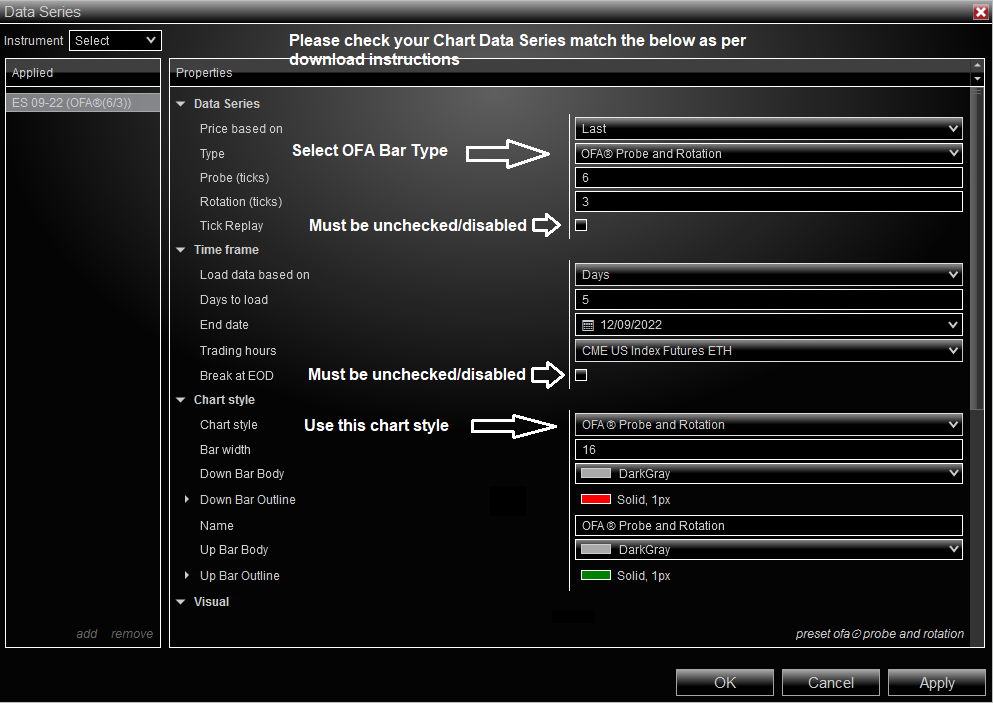
- Open NT8, Connect, New Chart -> OFA ® Probe and Rotation Type (not OFA Bars from prior version if user had prior ofa n8 beta version)
- Leave Tick Replay (If Showing) and Break at EOD Unchecked
- Ensure Templates is set to <None> in the Data Series Window when adding a chart for the first time
- Add OFA ® indicator (Not OFA/Ninja from prior version)
- Support FAQ
- Close OFA workspaces and charts in NT8. User/Pass pop-ups will fail if you skip this step.
If this is the first time authenticating with this version after step 8 you will be prompted for your login credentials.
For detailed instructions please visit the OFA NT8 Tutorial Section
Previous Version and Support:
- [memb_has_any_tag tagid=2434]
- Download OFA for NT8 v1.17.0.1 (previous build for NinjaTrader 8.0.27.1)
[else_memb_has_any_tag][/memb_has_any_tag]
- Detailed NT8 Support Guides
- Tutorials for OFA in NT8
- Technical Support http://ninjatrader.com/Help or help@orderflowanalytics.com
For Technical Support please contact: http://ninjatrader.com/Help or help@orderflowanalytics.com